If
Note: The If action is an early version and available only in non-production environments. Some behaviours and interactions are still being refined and the experience will continue to improve in upcoming releases.
Description
The If action allows a Flow to execute a block of actions only when a condition is met. Optionally, an Else block can be added to execute an alternative set of actions when the condition is not met.
Instead of adding the same condition to several individual actions, you can group those actions inside a single If action and evaluate the condition only once. When the condition is false, the whole block is skipped without executing any of the actions inside it.
Once the If action is set in the flow, you can add internal actions by clicking on the plus icon.
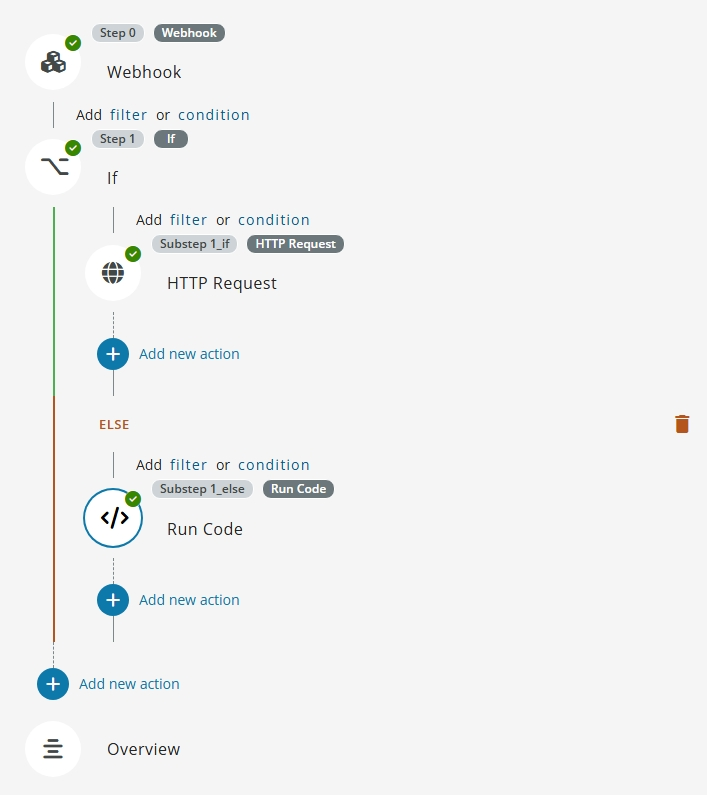
Condition
The condition of the If action is configured using the same editor and operators available for filters and conditions.
- The condition supports multiple expressions combined with AND/OR logical operators and grouping.
- Values can be static or reference output from previous steps using templating.
Blocks
An If action can contain the following branches:
- If: The actions executed when the condition evaluates to
true. - Else: An optional branch executed when none of the previous conditions are met.
When a branch is executed, the remaining branches are skipped without evaluating their conditions.
Internal references
Internal actions are those which are part of a branch of the If action. These actions have access to reference output results from other internal actions.
Output produced by an action inside a branch is available to the actions that run after the If action using templating expressions.
Nesting
An If action can be nested inside another If action, as well as inside (or containing) loop actions such as For Each and Until. When the outer condition is false, the entire nested content is skipped without evaluating the inner conditions.
Limitations
- It is possible to nest up to 5 loop actions (ForEach, If or Until) within one another. However, there is no limitation on the maximum number of these actions in a Flow.